Create
Build the rumble.
Use your kick to trigger the sound underneath it. Choose a sound model, shape its movement and set the tone, without assembling a separate rumble chain first.
SINEE Audiotools
The Complete Low-End Machine.
Generate rumble or bring in your own bassline. Shape the kick and everything underneath it, then bring them together as one low end.
Sound generation, envelopes, effects and final processing. One plugin, built around your kick.
VST3 & AU for macOS · VST3 for Windows
Since 2019
10,000+
copies of the original Kikzilla sold
The original Kikzilla arrived in 2019 and is still making rumbles today. Kikzilla 2 takes that idea further: from the sound under your kick to the way your entire low end works together.
The sound
Pick a kick or another source and switch between dry and Kikzilla 2 while it plays.
Kicks 808
127 BPM
Compare the source with the same passage processed by Kikzilla 2. Start playback, then use the two comparison buttons to switch versions.
Play a demo and switch between before and after. Use headphones or monitors: most of what changes sits below what laptop speakers can play.
Kicks
Rumble
Beyond the kick
The workflow
Start with a kick or bring a bassline into the track. Kikzilla 2 gives you one place to shape how they work together.
Create
Use your kick to trigger the sound underneath it. Choose a sound model, shape its movement and set the tone, without assembling a separate rumble chain first.
Integrate
Already have a bassline? Route it into the external input. Use the envelopes, filter and effects to shape its movement around the kick and make it part of the same low end.
Finish
Process the kick and rumble, or your routed-in bassline, independently. Then work on their sum with Glue, saturation, EQ and clipping, all inside Kikzilla 2.
Your kick. Your bass. One low end.
Inside the plugin
Choose the source, shape its movement, work on the kick and bring the two together. The sound engine, envelopes, filter, FX chains and mix controls are all part of the same workflow.
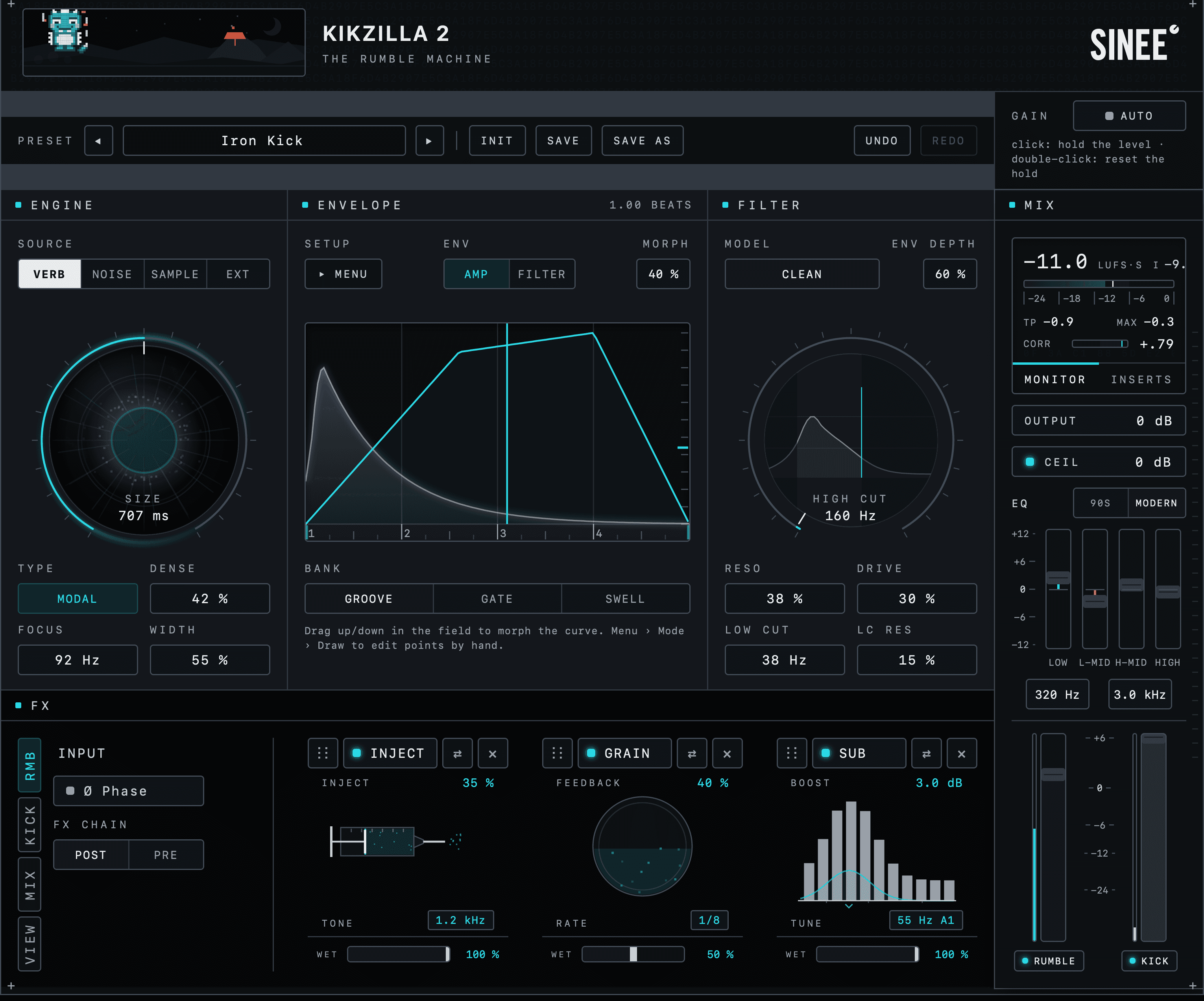
Engine
Start with verb, noise, samples or an external signal.
Envelopes
Shape level and filter movement. Morph between curves or draw your own.
Filter
Set the tone with Clean, Comb or Dirty, plus drive and resonance.
FX chains
Three slots on the kick, three on the rumble and three on their sum.
Mix
Balance kick and rumble separately, then finish with master EQ, output clipping and level meters.
The bricks
Add weight where it is missing. Clear muddy low-mids. Build density, shape the hit and control the peaks. These are the tools that bring your low end together, not an extra page of effects.
13 effects. Three chains. Nine slots. Put each brick on the kick, the rumble or their sum, and arrange the order around your sound.
Weight
Sub
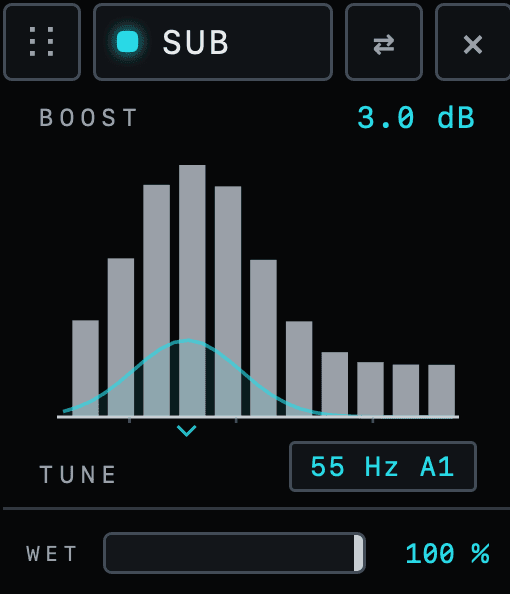
An adaptive sub enhancer with a tunable focus. Choose where you want more weight and shape the foundation of the kick.
Clarity
D-Mud
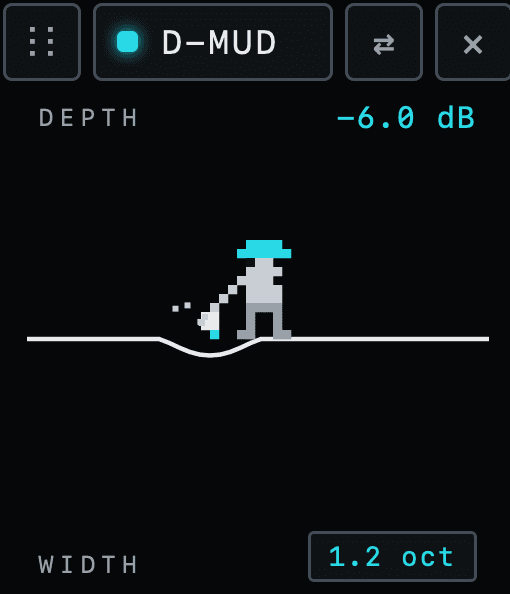
Dynamically reduce muddy low-mids instead of cutting them by a fixed amount. Clear the build-up between kick and rumble while shaping the sound as a whole.
Density
Mag
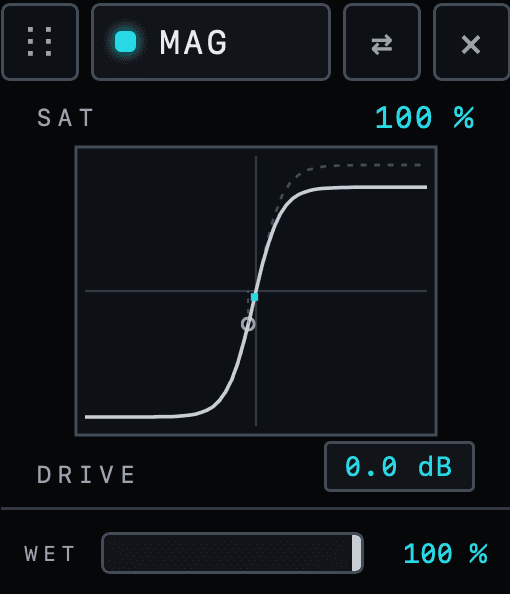
Transformer-style saturation that adds density and character. Use it on an individual chain or bring kick and rumble together with a shared layer of colour.
Cohesion
Glue
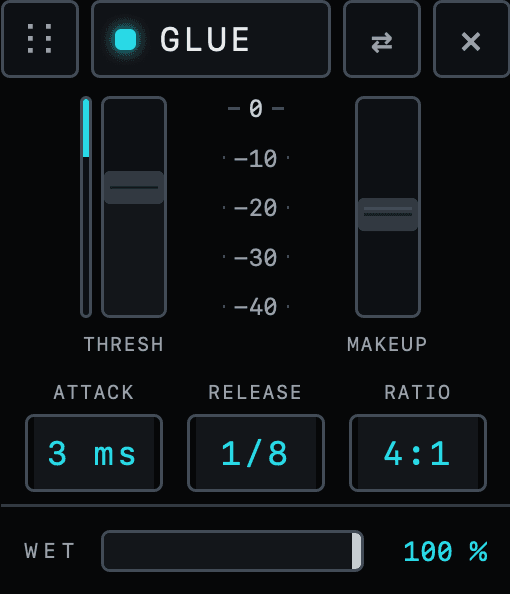
A glue compressor tuned for kick and rumble. Shape their shared dynamics and bring the low end together.
Peak control
Clip
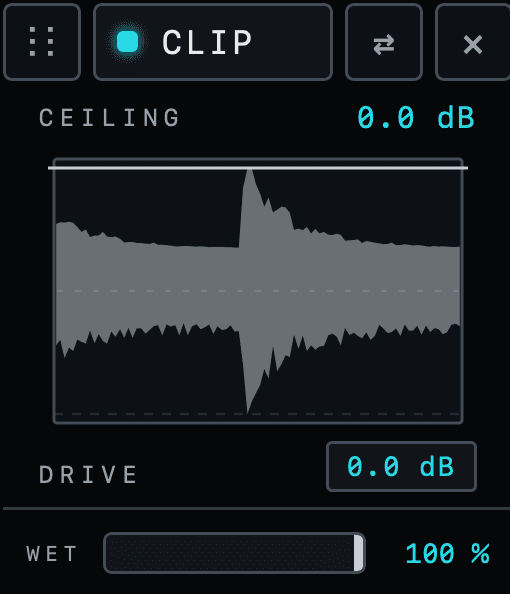
A dedicated clipper with up to 8× oversampling. Use it on the kick, the rumble or their sum to control peaks and shape how hard the sound hits.
Up to 8× oversampling on the Clip brick.
Attack
Snap
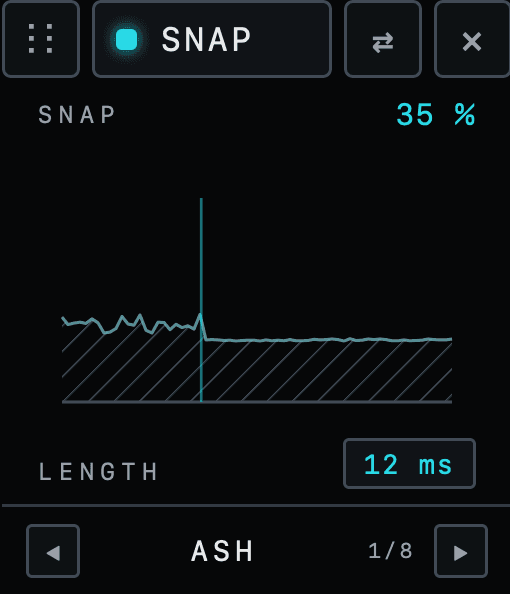
A transient designer that changes the character of the attack. Shape the front of the kick before bringing it back into the low end.
OTT
Dynamics
Three-band upward and downward compression for density and detail.
Tone
Colour
Preamp colour and tilt shaping in one brick.
Inject
Colour
Noise-driven texture for rougher, dirtier low end.
EQ4
EQ
Four bands of EQ wherever you need them in the chain.
Groove
Delay
A two-tap delay for turning a hit into a rhythmic pattern.
Grain
Delay
Granular delay for texture, movement and width.
Filter
Filter
A character resonant filter you can place inside an FX chain.
Separate wet and bypass controls for every slot · Drag to change the order
Free 14-day trial
Put Kikzilla 2 on your own material and hear how the low end comes together. Try the full plugin for 14 days, with every sound model, envelope and FX brick included.
No sign-up and no email. The installer includes the full 14-day trial.
VST3 & AU for macOS · VST3 for Windows
After 14 days, Kikzilla 2 switches to dry bypass until you activate a license.
The engine
Start with a defined note, a deep body or a rough texture. Nine sound models give you different foundations for the rumble. Samples and an external input let you bring your own material into the same workflow.
Nine models. Different starting points.
Tonal to textural
Tonal
A defined note
Body
808-style sub
Modal
Tight body
Bloom
Opening movement
Wall
Dense wall
Delay
Rhythmic echoes
Classic
Noise texture
Grit
Rougher mids
Rubble
Broken texture
Bring your own material.
Start with one of 107 included loops, then shape it with the same envelopes, filter and effects.
Route in a bassline or another signal and make it part of the kick-and-low-end workflow.
Four source types: Verb, Noise, Sample and Ext
Shape the movement
Decide when the low end comes in, how it moves and when it gets out of the way. Morph between ready-made curves or draw the movement yourself.
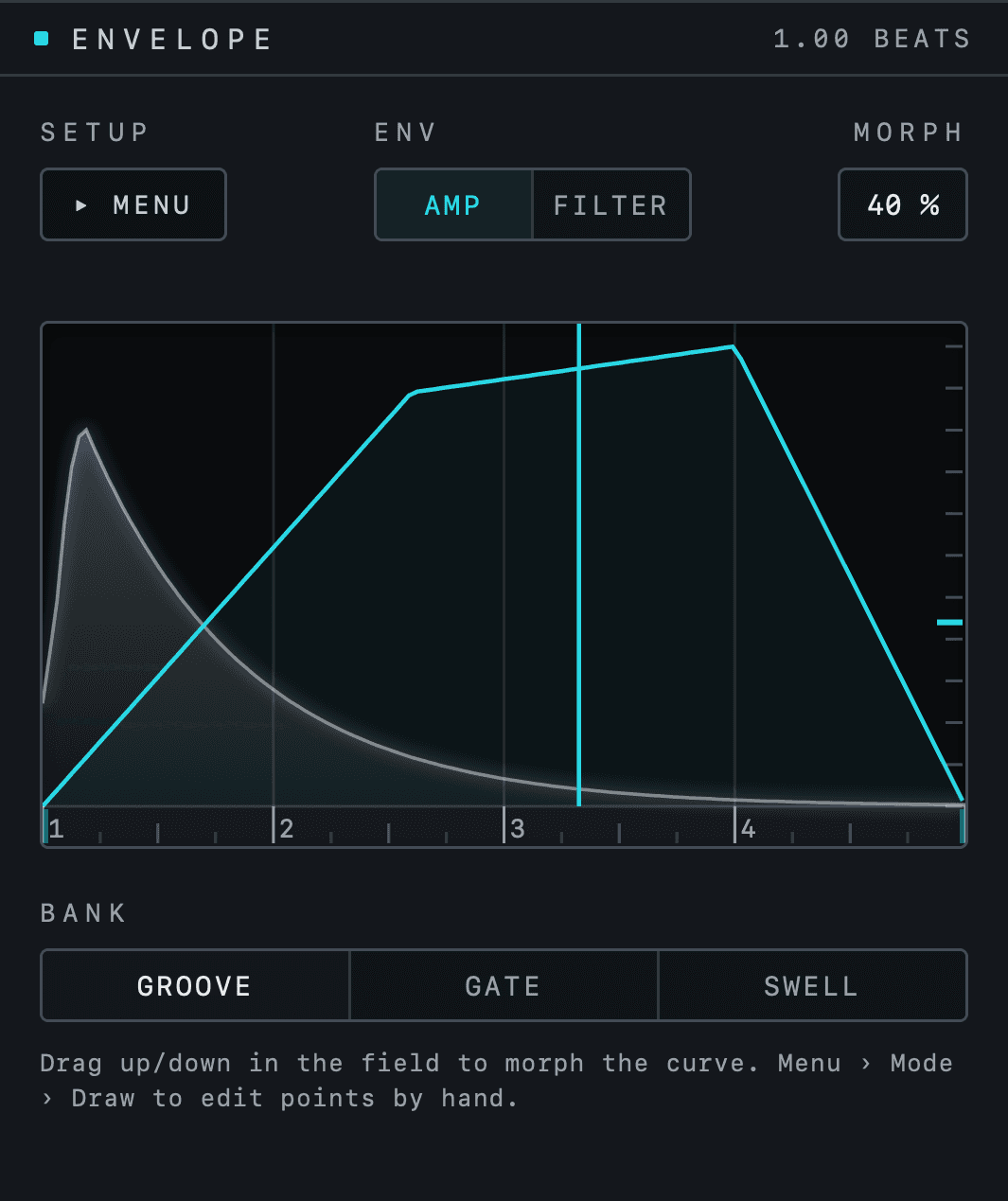
Morph
Move through 36 envelope shapes across three banks: Groove, Gate and Swell. Find the feel, then move between shapes without drawing every point.
Groove 12 · Gate 10 · Swell 14
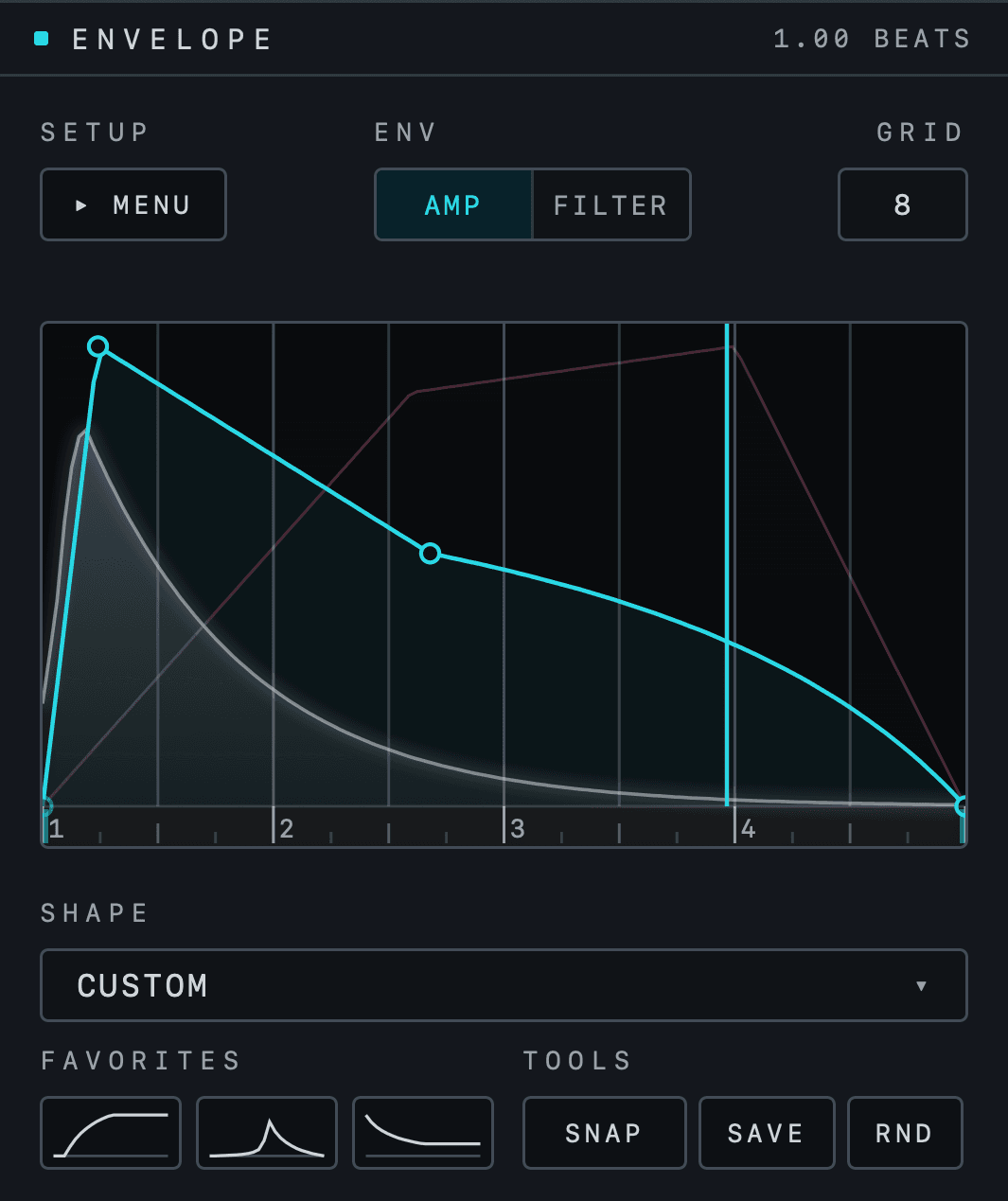
Draw
Set points, bend the curves and build your own movement. Start from one of 27 included shapes or take a morph shape into Draw and make it yours.
Editable points · Grid snapping · Curved segments
The kick sits beneath the envelope, so you shape against the actual hit. 63 shapes come with it, built for basslines: from a rolling groove to a simple swell to a rumble tail. Morph between them, or draw your own and save it as a favourite.
The bassline gets its movement here. No LFO tool, no external ducking to set up.
Two envelopes, one for the rumble level, one for the high cut, each with its own tempo-synced length. Trigger from the kick, run on the grid, loop while a signal is present or use MIDI.
Restarts on every kick · Length one beat · 63 shapes · Save as favourite
A bassline over four kicks, its level following the chosen envelope shape, which restarts on every kick. The shapes cycle on their own; use the buttons to pick one.
The filter
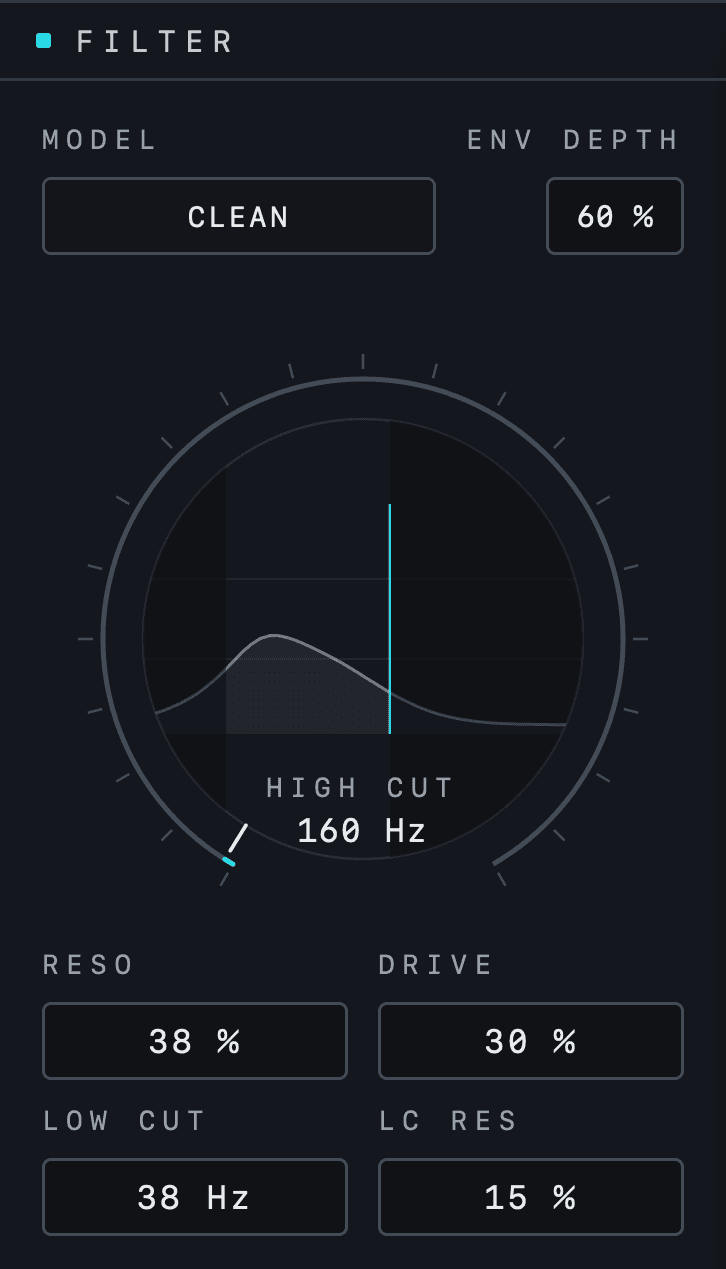
Choose Clean, Comb or Dirty. Add drive before the filter, shape the resonance and use the second envelope to move the high cut over time.
Three models
Clean
A plain slope. The high cut does its job and stays out of the way.
Comb
Ridges on the slope, the resonances of a comb filter. Metallic, tuned to the cut.
Dirty
Saturates on the way down. The darker the cut, the more it grinds.
Drive before the cut. Saturation on the way into the filter, with the level made up after it.
The second envelope on the high cut. ENV DEPTH sets how far the cut opens with the hit and closes as the rumble fades.
A low cut with its own resonance. LOW CUT clears the space under the kick, LC RES puts a bump at the edge if you want one.
The Kikzilla family
Kikzilla Lite rebuilds the direct rumble workflow of the original. Kikzilla 2 takes that idea further, with tools for shaping and processing the whole low end.

Lite also includes Auto Gain and up to 8× oversampling on its output clipper.
Get Kikzilla 2
Every Kikzilla 2 feature included. No subscription.
Kikzilla 2 · The Complete Low-End Machine.
€79
€99
Launch −20%
Launch price · One-time purchase · Incl. VAT
Nine internal sound models, plus Sample and Ext sources
107 included loops
Morph and Draw with two envelopes
13 FX bricks across kick, rumble and sum chains
Master EQ and output clipping
Kikzilla Lite included
VST3 & AU for macOS · VST3 for Windows
Where you buy
Checkout takes place on sinee.de, our own shop. The same team is behind the plugin and your support.
★ 4.8 on Trusted Shops, 1,500+ reviews
Checkout in English or German
Trusted Shops buyer protection
Support in English and German
Kikzilla Lite · The Rumble Machine.
The original Kikzilla idea, rebuilt as a focused new plugin. Six verb and noise characters, the classic envelope workflow, the filter from Kikzilla 2, Auto Gain and output clipping. One panel. No tabs.
Before you start
Kikzilla 2 is built around an incoming kick. Use its sound sources to create the rumble, shape an external bassline or process the kick and low end together. Your kick remains the starting point.
Yes. Route your bassline into the external input and select Ext as the source. You can then shape it with the envelopes, filter and FX chain and process it alongside the kick.
The sound sources, envelope shaping, filtering and effects are inside Kikzilla 2. You can build and process the rumble in the plugin, then use its mix controls to bring it together with the kick. External bass processing requires routing your bassline into the plugin.
Kikzilla Lite focuses on the direct rumble workflow: six verb and noise characters, a classic envelope, filtering, Auto Gain and output clipping. Kikzilla 2 adds more sound models, Sample and Ext sources, Morph and Draw, two envelopes, modular FX chains and master EQ. Kikzilla Lite is included when you buy Kikzilla 2.
Yes. You can try the full Kikzilla 2 for 14 days, including all sound models, envelopes and FX bricks.
Kikzilla 2 switches to dry bypass until you activate a license. Your session can keep playing, but the plugin is no longer generating or processing the low end.
No. Kikzilla 2 is a one-time purchase with all Kikzilla 2 features included.
Purchase Kikzilla 2 through our shop at sinee.de. SINEE also handles support, in English and German.
